
"Real" Computer Icons
These are Windows desktop icons (.ico) which can be used to replace the
standard My Computer icon.
They are all 32-bit with transparency -- they render properly only on Windows XP systems.
The standard My Computer icon looks like the icon on the left in the screen shot.
One day I thought, "Why not have a My Computer icon that actually looks like my own computer?!"
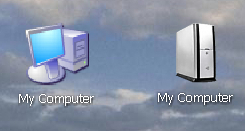
I use a Gateway 500S Tower (shown above) so that's the first one I made.
I didn't make many more after that -- just a few from some of the major computer brands.
To download an icon right-click it and then click Save target as.
Compaq
 |
CPQ 6000T-Z-V
 |
CPQ 6370-US
 |
CPQ 8000Z-T
 |
CPQ SR-1000
 |
CPQ SR-1130-NX
Dell
 |
Dell 2400 (front)
 |
Dell 2400 (side)
 |
Dell 4600
 |
Dell 4600C
 |
Dell XPS
 |
Dell 8300 (left)
 |
Dell 8300 (front)
 |
Dell 8300 (right)
E-Machine
 |
E-Machine 2542
 |
E-Machine 2824 (left)
 |
E-Machine 2824 (right)
 |
E-Machine 2958 (left)
 |
E-Machine 2958 (right)
Gateway
 |
GTW-3100/5100 (front)
 |
GTW-3100/5100 (side)
 |
GTW-500
 |
GTW-710
 |
GTW-500S (left)
 |
GTW-500S (right)
Hewlett Packard
 |
HP Media Center
 |
HP Pavilion M1090-M
 |
HP Pavilion Athlon
 |
HP D530 (vertical)
 |
HP D530 (horizontal)
 |
HP Pavilion (left)
 |
HP Pavilion (right)
Sony
 |
Sony 'R' Series
 |
Sony 'RS' Series
Back (To Free Icon Sets)
Home Page